Reusing your micro-services using Cellery
Dive into why Cells are the best way to reuse your micro-services.
Read on Medium (opens in a new tab)
In the past few years, there had been a big shift toward splitting monolithic applications into microservices. With this shift, developing scalable applications and reusing functionality had become easier. However, what most micro-service promoters would not tell you is how much of a nightmare it can be when the number of micro-services increases.
Deploying the same micro-services deployment in dev, test, and prod environments alone can be quite challenging when it comes to configuring and wiring the micro-services properly. Moreover, since the micro-service may define its own interfaces and might depend on many other micro-services, reusing micro-services can be quite challenging.
Helm (opens in a new tab) had solved this to a certain level by providing the ability to template the Kubernetes resources. However, even with Helm we still need to manually wire the micro-services. Moreover, once a Helm release is deployed, any other service is free to access these micro-services and this can lead to a spaghetti deployment architecture eventually.
Cellery to the Rescue

Cellery addresses these issues with an opinionated view of the deployment architecture by enforcing a proper structure and order to all the chaos. This article will focus on Cellery (opens in a new tab) and how it solves these issues using Cell-based architecture (opens in a new tab) and push/pull functionality using Cellery Hub (opens in a new tab).
Moreover, Cellery promotes a Code-based approach to provide the ability to customize building, running, and testing Cells according to the user requirements. Cellery also helps out in other areas such as observing your micro-services efficiently, updating the micro-services, traffic shifting, dependency management, etc.
What is a Cell?
A Cell is the unit of deployment in Cellery. A Cell in its simplest form is a collection of micro-services along with a network boundary restricting all incoming traffic.
A gateway is placed in each Cell which can accept incoming traffic from outside the Cell. The gateway is responsible for exposing properly versioned APIs which can be consumed by any other Cell. We only need to write the components and define the ingresses for each component and Cellery will automatically add a Gateway with the necessary APIs exposed.
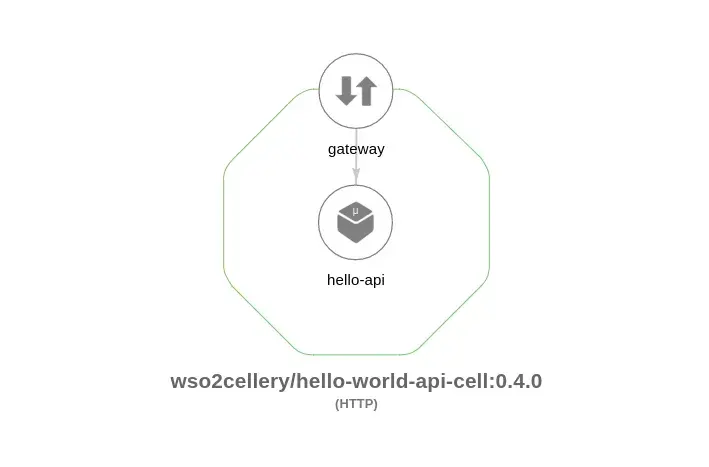
Note: If converting your current application to a Cell is too complicated at first, you can always try out Composites (Naked-Cells) which gives you all the goodness of a Cell without the restrictions on architecture. However, it is recommended to eventually convert all your Composites into Cells.
Writing a simple Cell with a single component is as simple as adding the following lines. (To view the full code along with the build, run and test life-cycle methods of this Cell and other Cells please check the samples (opens in a new tab).)
cellery:Component helloComponent = {
    name: "hello-api",
    source: {
        image: "wso2cellery/samples-hello-world-api-hello-service:latest"
    },
    ingresses: {
        hello: <cellery:HttpApiIngress>{ port: 9090,
            context: "/hello",
            definition: {
                resources: [
                    {
                        path: "/",
                        method: "GET"
                    }
                ]
            },
            expose: "global"
        }
    }
};
Note: Cellery Component ingresses are not equal to K8s ingresses. However, K8s ingresses (along with other necessary components) will be added automatically by Cellery if the Component ingresses need to be exposed globally.
How does a Cell help solve the Chaos in reusing micro-services?
When we look at the above example of a Hello World Cell, the question that comes to our minds is why should I bother with a Cell for such a simple microservice.
The actual chaos of micro-services becomes a problem after the number of micro-services grows in number. Although for simple applications this would not be an issue, chances are high that you would run into this issue sooner than later as the requirements grow.
Taking a look at how the Hipster Shop sample (opens in a new tab) provided by Kubernetes can be transformed into Cells will help in understanding how Cellery helps solve this issue.
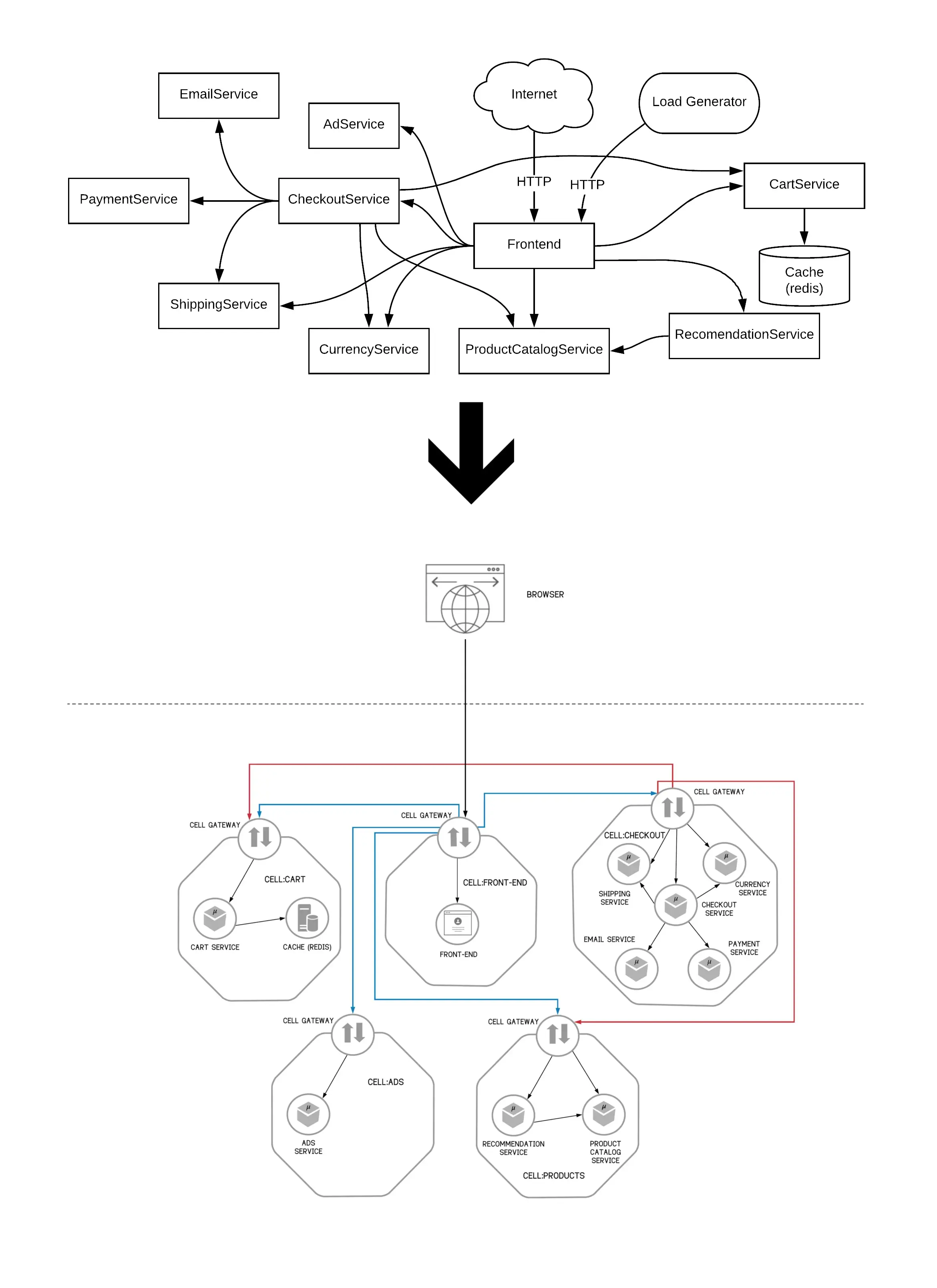
Imagine the above application along with many other applications sharing some of the Cells (E.g.:- Checkout Cell being shared with other applications along with Hipster Shop) running in a Kubernetes cluster. Managing such a deployment with the appropriate versions consumed by the correct micro-services alone can be quite challenging.
Moreover, the chances are in such a scenario, multiple teams will be managing different Cells. In a situation like that, managing a production setup, upgrades, maintaining test environments, etc. can be challenging.
Consider a scenario where the Checkout Cell is upgraded by a major version with breaking changes and only some of the applications had been changed to use the new version. If we are to modify the current deployment to cater to this requirement, it would require many changes and a simple mistake could break multiple applications at the same time.
With Cellery, we will be considering a set of micro-services as a Cell and we will define a set of dependent Cells and API versions they will be exposing. If we are handling the above scenario with Cellery, it will automatically validate and show warnings when there can be breaking changes due to API version mismatches. Moreover, you can easily route traffic between them and handle the upgrades gracefully.
Cellery helps the developers as well by making it easier to start up instances equivalent to the production setup with ease. If we are to start the Checkout Cell which was developed by someone else, it is as simple as running the following command in your development environment. Cellery will automatically start up all dependencies and start up the Checkout cell instance with the name “checkout-cell-inst”, freeing up time we would have spent trying to find out the necessary dependent Cells (Cart Cell and Product Cell) and start them up.
cellery run wso2cellery/checkout-cell:latest -n checkout-cell-inst -dCreating a Cell Image
Reusing a Cell starts with building a Cell Image from a Cell file. A Cell Image is a blueprint of a Cell describing how it should be run on the cluster as well as how it should be tested. A Cell Image also specifically binds to a set of dependencies that are required by the Cell.
Cellery will ensure that the direct dependencies, as well as transitive dependencies, are started in the correct order and also will wire them accordingly. Cellery also helps out in traffic routing by warning against advanced deployments with mismatching API versions.
Therefore, these Cell Images which contain a blueprint of a Cell can be reused by different Cells without much of a hassle at the deployment level. Cellery will take care of sharing the Cell instances and wiring them accordingly.
Cellery Hub
To add more sprinkles on the top, Cellery comes with the ability to push and pull Cell Images using a Registry named Cellery Hub. Cellery Hub can be used to share your Cells with others. Even if you are working in a team that deals with multiple teams, Cellery Hub can be used to share your Images. Cellery Hub provides you with the ability to search for Images as well as check what the Cell looks like including its dependencies.
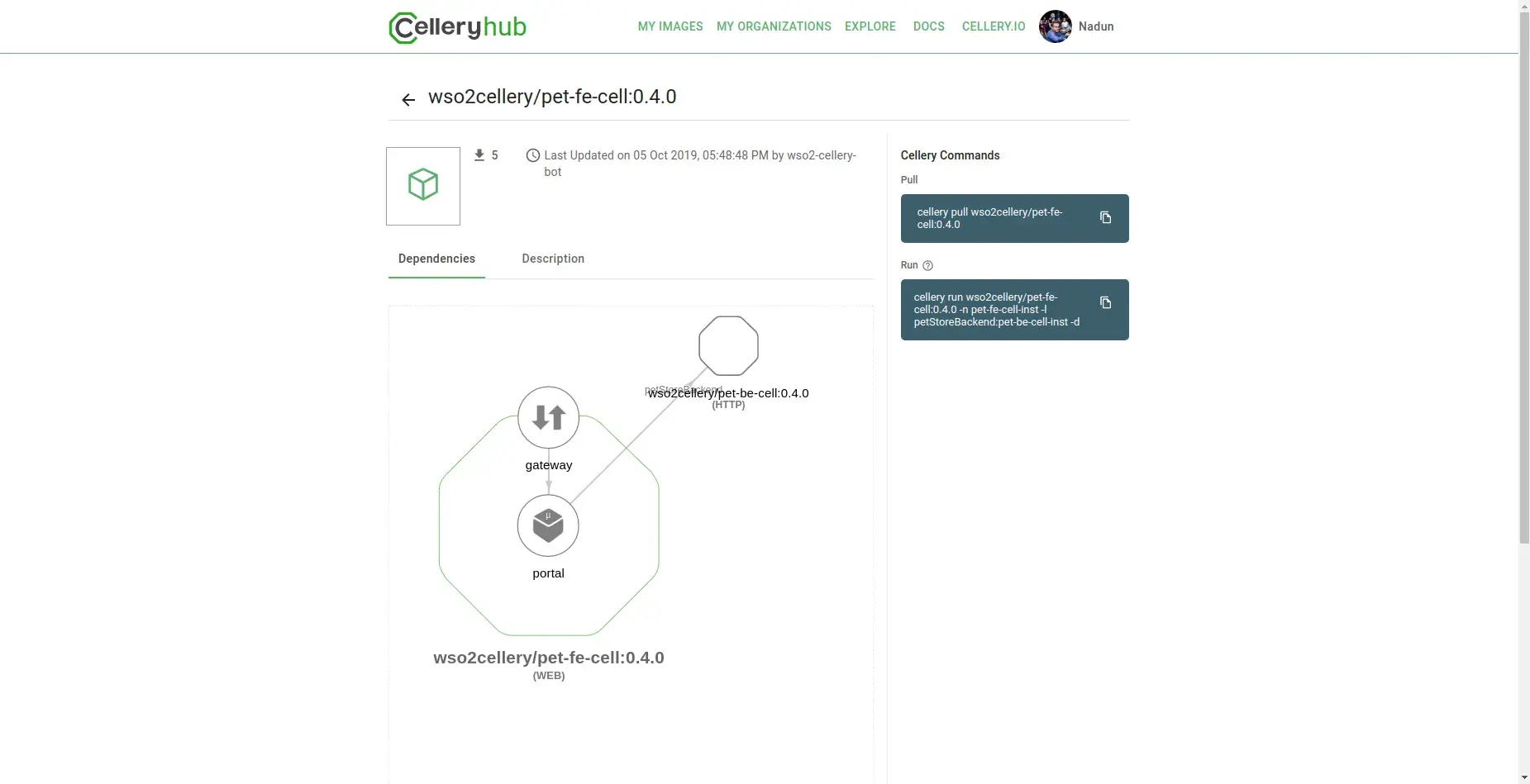
The Cells as you can see are self-documenting, reusable units of deployment that help out in deploying and managing micro-services in a reusable manner.
With Great Power Comes Great Responsibility
Although all these nice features are available to us with Cellery, the responsibility still falls on us to properly group the micro-services such that they can be reused by other Cells. Cellery only provides us with the power to model the micro-services in such a manner that they are reusable on a larger scale. The Cell developer still has a responsibility to write a proper Cell.
Moreover, although Cellery seems like a tool for larger applications, it still provides you with the tools for managing even smaller deployments allowing you to start using Cellery at an early stage so that much bigger chaos can be avoided in the future.
In conclusion, with the help of Cellery, due to its proper structure enforced at the deployment level, reusing Cells is relatively simpler. From development, and testing to production setup, Cellery helps out us to manage the micro-services. To make everything much sweeter, Cellery provides support for Observing Cells, Updates, and Traffic Routing at the Cell level to make our lives easier.